
This is a sponsored post for GigSky.
I always think I’m going to switch off completely on holiday (when it’s not a working trip, anyway…). Then I get to the airport and realise my phone has quietly become my travel assistant, map reader, organiser, boarding pass holder and occasionally my memory too.

The funny thing is I don’t actually use dozens of apps while cruising. Most of them sit untouched for months. But there are a handful I seem to open every single trip without thinking about it.
They’re the apps that stop little travel annoyances becoming big ones, help me avoid wandering around a port looking completely lost and save me from that horrible feeling of wondering if I’ve forgotten something important. Maybe this’ll help you…
Get 20% OFF GigSky eSIMs
Enter code CRUISEMUMMY20 at checkout to get this discount
Cruise Line Apps
This one’s an easy starting point because cruise line apps have gone from being “quite handy” to “basically part of the cruise experience.”
Before sailing I use them for digital boarding passes, checking in online and making sure all the boring admin is sorted. Some cruise lines also put your muster information in the app, so you can complete parts of the safety process before you even step onboard.

Once the cruise starts, it becomes my daily planner. I’ll check restaurant bookings, browse activities, look at excursion times and work out whether I can fit in trivia, lunch and a show without accidentally booking everything at once.
The good news is that cruise line apps work on cruise ships even if you haven’t bought any kind of internet package. They’re essential use and so the cruise line can hardly stop you from accessing them, can they?
I still grab a paper daily schedule sometimes because old habits die hard, but I always end up opening the app too.
Notes And Checklist Apps
This might be one of my least exciting travel habits, but it’s genuinely useful. Having everything on hand just makes it easier to keep on track and make sure I don’t forget anything in all the excitement.

I keep packing lists, reminders and random little notes that I’d otherwise forget.
Things like:
• Remember luggage tags
• Passport in hand luggage
• Cabin number
• Buy water before boarding
• Check online check-in times
It sounds boring until you’ve forgotten something important once. Trust me, you soon learn that a reminder like this is really helpful!
I also use it for keeping notes about my cruises that I can write up later, to help you. And these days, everyone loves to share their own stories on Facebook, so maybe you’d like to do something similar before you post your own ‘cruise blog’ online?
Messaging Apps
Cruises seem to create endless little “where are you?” moments.
Family group chats become super useful before sailing and during travel days. They’re perfect for updating people if flights are delayed or plans change.
Then there are those classic holiday messages when you’re ashore:
“We’re near the fountain.”
“Which fountain?”
“We found a café.”
“We’ll just meet you by the ship.”
Simple things, but they save a surprising amount of wandering around. Having access to messaging apps both when you’re on the ship and while ashore just makes it easier for the group to split off, do their own thing, and still keep in touch to make sure nobody gets lost or left behind!
Maps And Navigation Apps
I don’t mind exploring, but I also don’t particularly enjoy accidentally getting lost in an unfamiliar city.
Maps are probably among the apps I use most in port.

I’ll often save places before arriving – attractions, cafés or landmarks I want to visit – so they’re ready when I need them.
And there’s also one very important purpose: making sure I know exactly how to get back to the ship. I really don’t want to miss the all aboard time!
Maps are also good just for identifying any places I might need to visit while I’m exploring. You never know when you might get caught up exploring and realise you could do with finding a small shop to pick up a cheap bottle of water.
Transport Apps
Taxi bookings, train times, ferry schedules, local transport routes – these apps are all useful when plans change or you’re trying to squeeze the most out of a port day.

They’re also great for avoiding the classic “we’ve definitely got loads of time” confidence that disappears very quickly when you’re watching the clock.
A little bit of research before you travel and you can have all the apps you need for your chosen destination, primed and ready to go.
Rideshare apps in particular are great because they’re so widely used. Being able to get a reasonably-priced taxi to get you to your destination or back to the ship is a lifesaver.
Translation Apps
My language skills are largely limited to confidently ordering food and then quietly panicking when somebody asks me a follow-up question.
Translation apps are therefore incredibly useful for simple things while travelling.
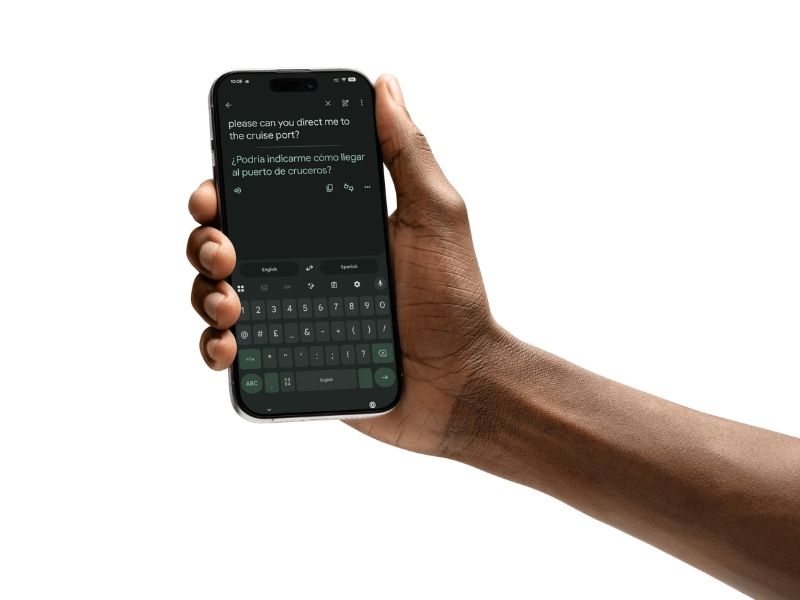
Reading signs, understanding transport information and translating menus can make places feel much easier to navigate, which just means I feel more confident and comfortable as I’m getting around.
And menu translation can occasionally prevent accidental food surprises too. As a vegan, the last thing I want is to accidentally order something that sounds safe but contains meat! Anyone with allergies or intolerances will also find these apps really helpful for making sure they eat safely while ashore.
I know, I know. Email sounds like one of the most boring apps to have to use when you’re on holiday, but it really is essential sometimes.
Yes, I work remotely and so may keep an eye on work emails. But actually, everyone needs to check their inboxes on holiday every now and then, whether you plan to or not.

Most travel documents seem to end up there eventually. Airline updates, hotel confirmations, excursion tickets, airport transfer details and all those booking references you were certain you’d remember but definitely didn’t.
And if something unexpected happens, email can suddenly become much more important. If your luggage goes missing, your flight is disrupted, or you need to make a travel insurance claim, there’s a good chance the documents you need will be sitting somewhere in your inbox. Having access to policy details, claim numbers and confirmation emails can save a lot of stress when you’re already dealing with an annoying situation.
Hopefully you’ll never need any of that, of course. But even for everyday travel, it’s reassuring knowing that all those important documents are only a couple of taps away rather than buried in paperwork back at home.
The eSIM That Covers It All
If you’ve noticed a theme, it’s that most of the apps I actually use while travelling aren’t particularly data-hungry.
I’m usually checking messages, looking at maps, translating a menu, booking a ride back to the ship or pulling up an important email. These are small, practical things that make travelling easier rather than activities that use huge amounts of data.

So GigSky’s new Cruise Messaging + Essentials eSIM plan is something I’m really excited about. Instead of trying to replace every possible internet need onboard, it’s designed specifically around the apps many cruisers use most often – messaging, email, maps, translation tools and ride-sharing apps.
The idea is simple. You stay connected for the travel essentials both onboard and ashore without paying for more data than you actually need. It’s available on more than 290 cruise ships and also includes coverage in port, so you’re not constantly switching between different ways of getting online throughout your trip.
Of course, some travellers will still want full internet access for things like streaming, video calls or other heavier data usage. But if your main priority is staying in touch, finding your way around, accessing important travel information and getting from A to B, this feels like a much more tailored option for cruise travel.
And honestly, when I look at the apps I tend to use, that’s exactly how I spend most of my connected time while cruising.
The best part? It starts from as low as $5 per day, depending on how long your cruise is. How good is that?!
Final Word
Cruise holidays are supposed to feel simple, and I don’t want to spend the whole trip staring at a phone screen.
But there are certain apps that quietly earn their place every single time I travel. They’re not necessarily flashy or exciting, but they make things easier, save time and remove a lot of those little travel headaches.
And when the technology fades into the background and just helps the holiday run smoothly, that’s probably exactly how it should work – which is why an eSIM that handles just the essentials is perfect for me.
Get 20% OFF GigSky eSIMs
Enter code CRUISEMUMMY20 at checkout to get this discount

One thing I’ve started doing is making a calendar entry on travel days with all travel information for the day in a comment. Air flights, times, confirmation numbers, cruise port, cruise number, ship, hotel, etc.
Then when I need something it’s all in one place on my phone.