Think you’ll have to disappear from the internet for a week on a cruise? Not anymore.
Royal Caribbean’s WiFi is fast enough to stream movies, make video calls and keep up with social media from almost anywhere at sea. Thanks to the rollout of Starlink across the fleet, it’s also far more reliable than cruise ship internet used to be.

But before you buy a package, there’s something most cruisers don’t realise. The price can vary significantly, and choosing the wrong option could leave you paying more than you need to.
So which WiFi package is right for you, and what’s the smartest way to get the best deal?
Royal Caribbean Wi-Fi Cost
Most Royal Caribbean cruisers can expect to pay around $18 to $38 per day for VOOM WiFi, depending on the ship, itinerary, sailing date and when you book. Buying before your cruise is usually much cheaper than purchasing onboard.
The pricing’s a little complicated, but first, let’s look at the internet package on offer and what you get.
Voom Surf + Stream
The VOOM Surf + Stream Wi-Fi package is Royal Caribbean’s internet package. It’s a fast package that is designed to let you:
- video chat
- live stream on social media
- access streaming services to watch video content or stream music.
There used to be two Royal Caribbean Wi-Fi packages you could choose from, with a more basic ‘Voom Surf’ package on offer that was a bit cheaper.
However, since the introduction of Starlink, there is now just one Voom internet package for guests: the Voom Surf + Stream option. The Voom Surf package is no longer available.
Royal Caribbean Wi-Fi Pricing Explained
Royal Caribbean uses dynamic pricing, so the exact cost varies from one sailing to another. Buying before your cruise is usually much cheaper than purchasing onboard.
If you only want internet access for 24 hours, you’ll generally pay much more on a per-day basis than you would by purchasing a package for the full voyage.
The pricing can become a little confusing because Royal Caribbean offers discounts when you connect multiple devices under the same plan. The more devices you add, the lower the average cost per device tends to be.
If you want the best deal, buy your WiFi package before your cruise through the Royal Caribbean Cruise Planner. Not only are pre-cruise prices usually lower, but you can also keep checking for discounts and rebook if the price drops before you sail.

There’s No Free Wi-Fi on Royal Caribbean
Generally, Royal Caribbean cruise ships don’t have free Wi-Fi access, and guests have to pay for it. The only exception is guests who have booked a Star or Sky Royal Suite Class suite, where each guest gets one free Surf + Stream package.
You can get some free internet access if you’re a loyal Royal Caribbean cruiser. Guests who reach the Diamond or Diamond Plus tiers of the Crown & Anchor Society get one or two free days of internet, respectively. Anyone who manages to reach the very exclusive Pinnacle Club tier gets free unlimited access for one device throughout their cruise.
There are some ways you can enjoy free Wi-Fi access during your voyage, including when you’re in port. You can read more about those here: How to get free Wi-Fi on a Royal Caribbean cruise.
Using the Royal Caribbean App Without Wi-Fi
You don’t need an internet package for the Royal Caribbean app to work. It also won’t use your own mobile data, so you won’t have roaming charges. Just connect to the ship’s Wi-Fi to use the app for free.
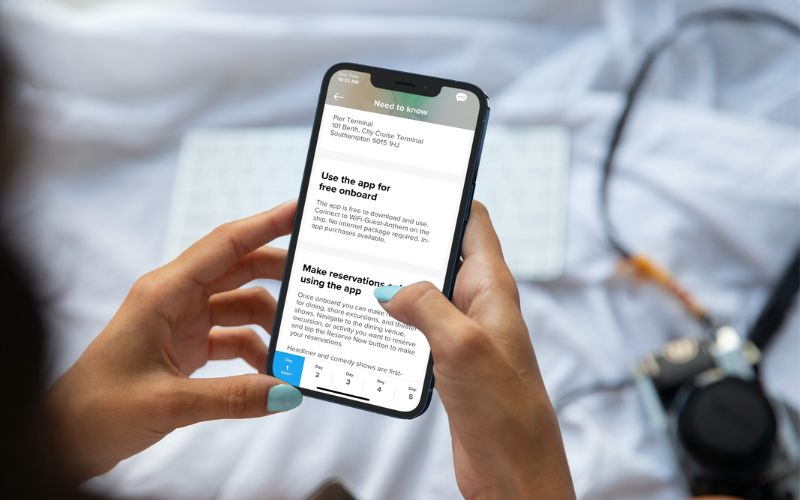
It’s wise to download the app well in advance of your cruise. You can add all of your details to make checking in much quicker and easier. It also has lots of useful info, so you can familiarise yourself with your ship before you embark.
The Royal Caribbean app is a really handy tool that has different features depending on your ship. You can use it to order food, make bookings for shows and shore excursions, and book your future cruise, among other things.
NEW DEALS JUST RELEASED!
Don’t miss the latest Royal Caribbean offers…
The Value of Royal Caribbean Wi-Fi
It’s really difficult to say whether Royal Caribbean’s Voom Wi-Fi packages are worth the cost. It’s expensive, as is any cruise line’s internet access. Now that Starlink has been introduced, the speeds are usually reliable, depending on where you are in the world.
You’ll also spend a lot of time in port on most cruises, where you can either find free Wi-Fi or use your 4G or 5G connection on your phone. There may be roaming charges, but these could be less than the cost of the internet package.
Suggested read: How to Avoid Roaming Charges on a Cruise
If you’re someone who needs to be connected at all times, then Voom is one of the fastest cruise line internet services available and is easy to set up. It’s worth it if you simply must have internet access.
But if you can manage without it – and on a Royal Caribbean ship, you will be busy – then it may be better to save the money. On my latest Royal Caribbean cruise, I didn’t buy the Wi-Fi package. I enjoyed having a digital detox during the sea days, then catching up once the ship docked at each port.
How to Connect to Royal Caribbean Wi-Fi
Getting set up with a Voom package is easy. All you need to do is open your device’s Wi-Fi settings and connect to the network ‘royal-wifi’.
Open up a browser, if it doesn’t do it automatically. It’ll then take you through the steps you need to get connected.
If you’ve already prepaid for your internet package, then it will recognise that you have a package waiting to connect. Otherwise, you’ll have to choose which one you want, and the cost will be added to your onboard account.
Usually, it’s a really easy process, but sometimes gremlins can get into the system. If you do have any issues, just head to Guest Services and they’ll be happy to help you get connected.
The Bottom Line
VOOM is among the fastest cruise ship internet services available today, but it’s also one of the most confusing, since prices aren’t set in stone and can really vary. If the internet costs seem expensive, you might want to risk waiting until nearer to your sail date, but then they could go up even more.
The best advice is to only pay for it if you really need it. Otherwise, try to get by with your 4G or 5G signal when you’re in port, or ask the crew for tips on where to find free Wi-Fi access ashore. You’ll save a lot of money, and all those cruise photos can just be uploaded when you get home instead of live as they happen.

NEW DEALS JUST RELEASED!
Don’t miss the latest Royal Caribbean offers…
Related Posts:
- 3 Ways To Get Free Wifi on Your Royal Caribbean Cruise
- 13 Royal Caribbean Cabins To Avoid
- These 8 Drinks Are Free on Royal Caribbean Cruises